


 |
CacoArchCD This tool reads the content of inserted CD-ROMs or any other directory-based media readable under Windows. Then, CacoArch stores the data into small database that lets you later find special apps etc. quickly. |
| 1) Introduction You probably know that: you backuped you data on
a CD-RW or ZIP-Disk and have already more of'em. Asking
yourself "Were's did damned picture I made two years
ago?", you insert every disc, browsing and searching
the dirs, needing several minutes or even hours. |
||
|
||
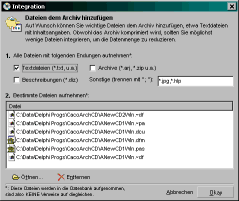
| 2) Wizard Reading a new media is very simple: as shown in
fig. 2, you are guided step by step and you can set
special variables regarding the recording of the disc's
content. So you can specify which drive to scan, put the
new record into a special cathegory (e.g. pictures,
programs, backup) and give it a name different from the
original label. |
||
|
||
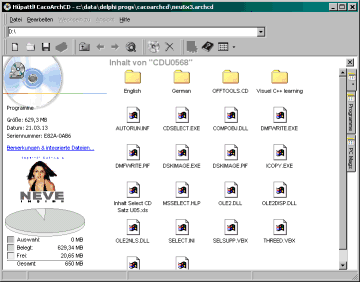
| 3) Retrievals When you have created a database containing multiple volumes, you see several icons (if available, the original ones as shown in the explorer when inserted) representing the medium. When clicking it, you see a dirtree, which you can examine manually - just as if the disc was in the drive. Additionally to the icon, you can identify a medium through it's cover (see fig.1). In the lower right of the main window, there's a pie-diagrm telling you the sieze, free space and size of selected files. Even disk geometry information is available - you won't miss a thing. |
|||||
|
|||||

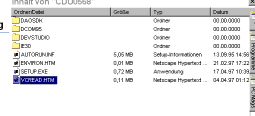
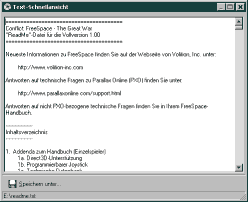
| 4) Build-in data As mentioned, you can store original files into the database. As shown in fig. 5, you can see'em with the internal viewer. Do not be afraid that this will cost much disk space: each database in CacoArchCD is compressed using ZLib, having the same pack rate as the well known PK-Zip. For example, an uncompressed image of a 4 GB harddrive wastes an amount of data of approx. 1.2 MB (only strings telling where which files are to be found!!!). But by using ZLib, these entries are shrinked to 300 KB. |
||
|
5) Features & Requirements
| -runs on Windows 98 or Win95 + IE4 | -capable of storing original files | |
| -Pentium 166 or equal recommended | -informs about attribs, size, free space etc. | |
| -needs approx. 2 megs (app) of free space | -compressed database | |
| -stores orig. icon and CD-cover, if specified | ||
| -reads any kind of media (CD-ROM, FD, HD, Zip...) | -cathegorizes volumes into groups | |
| -records the file structure of each volume | -file or dir search function (disk/database) |