


Basics: File structure
Header
Our file will be divided into three basic parts: header, data and table of contents (toc). The sense of the header is quite simple: you can leave major information on the datafile, e.g. containing the version of the file, a name, date ecetera. In our case, the header only bears low amount of information: the version and a very special number - what this number means is shown below on this page.
Data area
The data area is of course the most important one. Here are all buffers saved as a chain, this part of our file can be very large, up to some megabytes or even more. But how shall we know where which data begins and where it ends? Therefore we have our...
Table of contents (TOC)
The table of contents hold all important information of each data entity. For example you can save there a name or alias, date, description, rights/attribs or anything you want, there is no limit. But there is one thing that must be in there: the whole file - including header, data and toc - is build up from single characters, each having a position, an address. So you can say that the data begins from character 64 and ends on character 298743. So you have to save within the toc, where a single fragment begins and where it ends, thus we can read these bytes out and retrieve the data.
File's layout
Here a graphic showing you the structure of our file. Maybe you will wonder where some "parts" are placed...let me explain below...
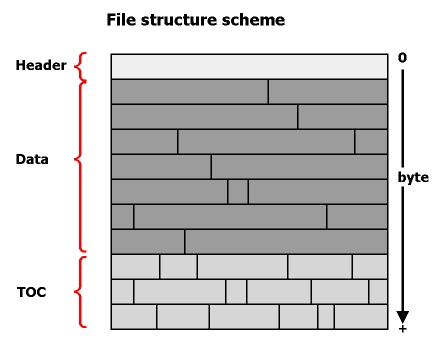
As shown in figure B1, you see that the file is divided into these three different parts. Now you might ask, why the table of contents is at the end of the file. The reason for why I did this is quite easy: when adding, deleting or editing existing data, the whole file has to be restructured (you can say defragmented...). For example, we rename a data entry from "Picture from Neve" to "Picture from Neve Campbell #1" :-) you see that the name has changed its size, in thise case, it grew. If the toc would be in front of the data block, we would have to move the whole data some characters ahead. Remind that this data could size some megs, so this can cost valuable time. But if the toc is located after the data, only the toc has to be reconstructed - which is in average less data than in the data block. Now you might say, if we modify the data itself, the file also has got to be reconfigured - you are right, but in the Advanced chapter we will learn ways to avoid this or to make it faster at least.
Now we come to our "magical" number in the header we spoke of at the top of the page: this number is nothing more than the location of the toc, so that our component knows where it has to look for the toc, cos the data block is always of a different size. - Ah yes, speaking of sizes: another possibility would be to locate the toc at the beginning of the file, but the disadvantage would be that we would be forced to operate with fixed sizes, meaning the toc may not have more than xy bytes in length - the file would have a limit of entries, that is not good.
A small example
Here I will show you an example of what the header and the toc can look like. The header: as I already said, we include in our version only tiny information that identifies the filekind and version and contains our "magic" number telling where the toc starts. This header might look like dis:
[NevepriseZLibPOD v3.5 #00054318745]
What is this??? Okay, let us start: this header has a fixed length of 36 characters, commencing and ending with brackets. In fact, they are just charade, looks nicer and you can better see, where the header starts and stops. At the beginning, you see "NevepriseZLibPOD" - this is our ID string, so that your app knows it is the kind of file it can handle. Of course you can put in there what you want. Then there is a "v3.5" which is the version number of the file. Note that this ver only identifies the file version, you should not put the version number of your component in here. The reason for this is that you may develop files structured a different and/or better way (e.g. with another structured toc), so your component knows wether it can handle the file or not. After the number caret you can see our magic num, which contains the starting point of our toc.
Immediately after this header, the data starts, what often looks very crypted, so we will let it out in here....*g What has to follow is the toc.
WHen you start to develope your own component, this is a point to think a bit. You must know, what has to be in the toc and what not. If you later realize that you forgot something, it might take a huge amount of work to implement the forgotten things. Imagine, that our component is not developed for a special purpose, so we have to make the toc general and open. It might be that we will use our component that will be something like a file archiver such as Zip, Arj or jar (well, you can say, that is a joke, co we do not compress the data, so why archiving the data into one file, but we will later implement a packer having the compress rate of Zip...later I said *g), but it might also be used for custom and app-specific data, even containing strings ecetera. So let us think of what descrptions a data package must have.
So if it would be a file-archiver, we must at least save all possoble file properties: filename and path, size, date, attributes. We can let out all other properties like description and icon, cos they come from their registered applications. But what if we also want to create a database from our component? There may be other props we have to add, e.g. an alias name etc. Below, I will write down all properties as a record which describes a data entry, just to get things clear. This record will later be used to ease the work for an app in conjunction with the compinent.
TDataEntry = record
  FileName:  string;
  Alias:     string;
  Date:      TDateTime;
  Size:      cardinal;
  Attribs:   integer;
  xPos:      cardinal;
  xSize:     cardinal;
end;
Fig. B2: a code example that defines the properties of a single data entry.
I think the most things are obvious, but are the properties "xPos" and "xSize"? And why are there two props defining size? xPos tells our component where the corresponding data begins within the file, xSize tell, how many bytes it is long. The property "Size" is primary for external use (for the app), but will also be used for internals, cos I told you that we will use compressed data later. So when expanding the data, we know how large the compressed data is (when querying xSize), but we only know the uncompressed size via the "Size" property. The component does not know it to work, but we can use it for a progress indicator later on.
Know there is the question how to write the record defined above into the file. There are differnt ways, for example a record can be written indirectly into a stream, but for ease of understanding we will write it into the file as strings, divided by special characters:
FileName|Alias|Date|Size|Attribs|xPos|xSize
So we can read this "thing" as a string, what has to be done is that you write a function that parses the string and retrieves the single parts of it. For example you can index each entry. In my HueAPI unit (downloadable from Neveprise Inc.), I have declared such a function. It works like this: FileName:=StrDivideReturnH(TocEntry,'|',0); . "TocEntry" is the complete string, "'|'" tells the function which character operates as the dividing char, and the last number is the index, starting from 0, so that 0 is the first member in the string. You must just create functions, that apply the values read to a record.
The complete toc is nothing more than a chain of various strings like shown above. To extract them an easier way, you can use additional "divide characters" that let you/the component differ between complete toc entries or single elements. Here an example, how a toc consisting of two entries might look like:
$ZLibPOD:C:\autoexec.bat|AutoExec|02.06.1997 15:38:51|817|3|37|432%$ZLibPOD:C:\config.sys|Config|02.06.1997 15:38:52|236|3|469|96%
As you can see, each toc entry is introduced by a "$" and the word "ZLibPOD", each element of this entry is seperated by the pipe symbol "|' and the entry is closed by "%". When we commence our component, we will write a function that reads the complete toc and reads out every entry and its elements. Pooh, a lots of information, you better make a break...
 Back: A theory...