 Hüpattl! Software
Unterlumen 0.22 — Videos and Duplicates
Since Unterlumen replaced everything else on my NAS, I notice what I am missing day to day. This week it was two things: the videos in my photo folders, and the many photos I have twice — sorted into a category, exported for sharing, copied off a camera a second time. Versions 0.21 and 0.22 take care of both.
Videos
Folders and libraries now list videos beside the photos. A tile shows how long a video is, and while the pointer rests on it, it plays a three-second silent clip. The viewer plays the video itself: MP4, MOV and WebM, an iPhone’s HEVC in Safari and on a Mac. Formats the browser cannot play are listed with a still frame and offered as a download. The clip of a Live Photo is no longer a file of its own; the photo says “Live” and plays it.
The library filter has a Kind row at its top — photos and videos, photos only, videos only — and so do the map, the timeline and the statistics. Videos get their date and place from the file, so they appear on the timeline and the map. They are never changed: cropping, renaming, setting a location and publishing are for photos.
Duplicates
A new place under Cull finds the versions of one photo anywhere in your libraries, in one library or across them. It tells three cases apart:
- Identical — the same file in two places.
- Same picture — scaled down for sharing, or saved again at the same size.
- Similar — an edited, exported or cropped copy.
Each group shows every version side by side with its pixels, file size, format, name and folder, the largest first. You mark the ones you don’t want, and they are deleted in Marked for deletion, as always only when you say so. Only the copy you chose goes; the other stays in its library.
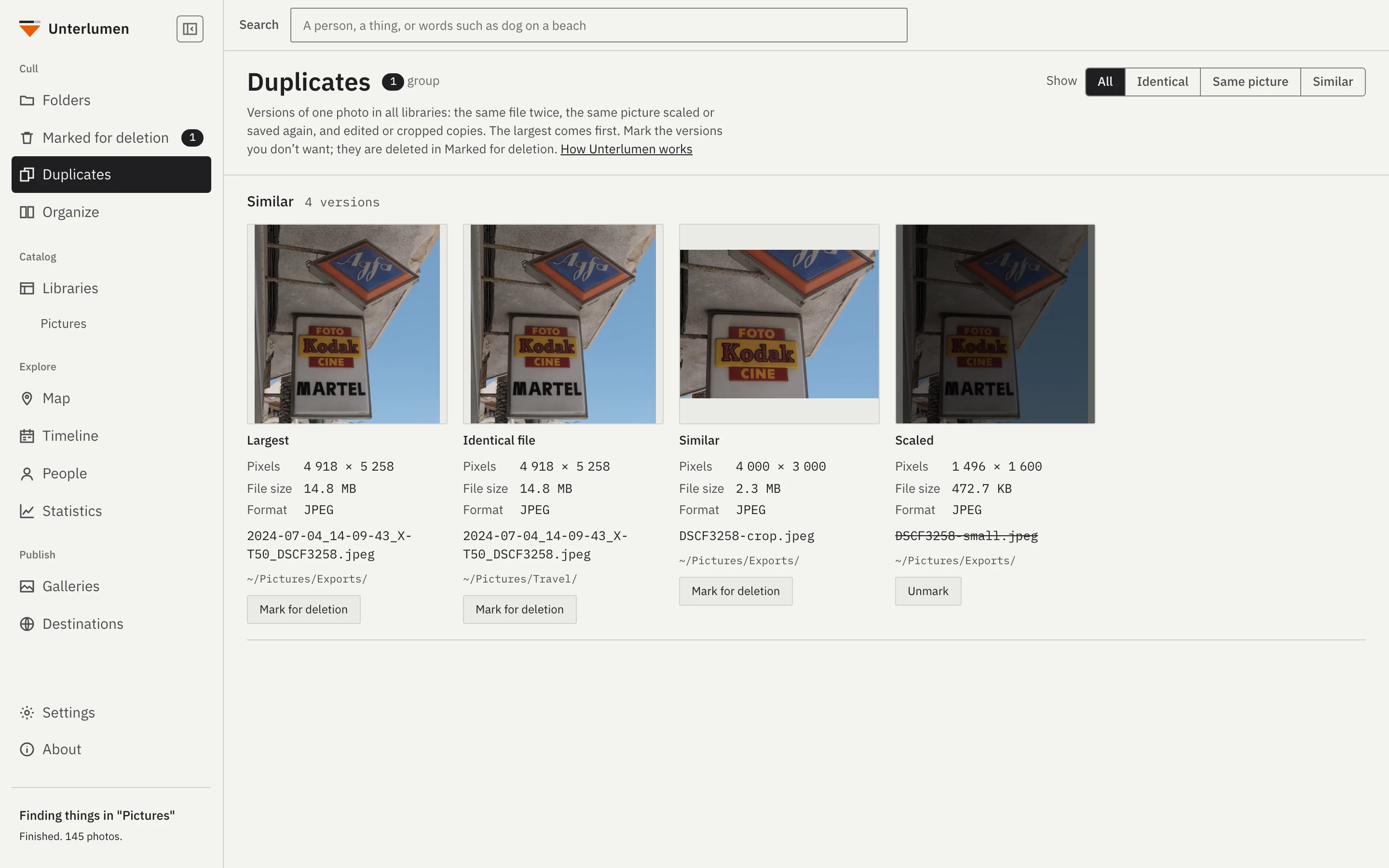
Nothing is measured again for this: every photo is already known by a fingerprint of its content, and a small fingerprint of its look. The hard part was what not to find. On my own libraries, the look alone joined the shots of a burst, and a whole photo booth evening in front of one wall. So a copy also has to be from the same moment, down to the fraction of a second the camera wrote. My 50 000 photos turned out to hold 866 identical groups, 680 of the same picture and 106 edited copies.
Smaller things
- Organize: drag photos onto a target, hold ⌥ to copy. Mark for deletion is always the first target, on key 0. Add target… opens on your libraries.
- Dates from file names. A photo without a date in its EXIF — a WhatsApp image, a screenshot — takes the date its name gives, so it no longer sorts behind everything else.
- Arrow keys move to the tile above or below, between folders as among photos.
- Fixes: a video’s play buttons can be clicked in the viewer, and the count beside Marked for deletion sits in its pill.
Try it
The product page has pictures of all of it and the ways to install it. Updating keeps your libraries. If something does not work as you expect, tell me on GitHub.