
introducing XSL
powerful transforming
XML already has proven its strength, but besides using XML as data exchange format etcetera, you sometimes have to translate one XML format into another one. That might sound boring, but this article shall show, that transforming can be an interesting thing for every-day use.
Table of contents
- 1.0 on transforming XML - why at all?
- 2.0 isn't this just for middleware / interface designers?
- 3.0 about XSL a bit more in detail
1.0 on transforming XML - why at all? > top of page
As XML is already widenly used, it is no secret that XML is just a metalanguage but not an implementation. Thus, there co-exist several XML formats for one and the same purpose. For example: documentation. There are several formats and applications that use XML as storage language:
- DocBook XML
- XHTML
- OpenOffice / Star Office 6.0+
- KOffice / KWord
- MS Office (younger versions, since 2000?)
- ... and NevepriseDoc XML
...just to name a few. However, just cos these formats use XML that does not mean that these formats can be opened by each application that is XML-aware.
But as you know, XML laid the cornerstone for simple automated processing: you always have a structured tree, the data is well-formed.
And yes, there is an own XML implementation called XSL that is designed to convert one XML format into another one. XSL stands for eXtensible Stylesheet Language.
2.0 isn't this just for middleware / interface designers? > top of page
Er, the second chapter is also the second question in this article, well, it was never designed to be an FAQ... :-)
But to answer the question: yes and no. That depends on if you want to
- interprete between more formats interchangeably (i call it the "cross method")
- internally use one format but serve many (like to call it "inside out method")
2.1 cross method > top of page
For what i am calling the cross method, just imagine a tool that was made to interprete between several formats. A perfect utilization would be for example a converter in an office suite: it could import alien XML formats into the "own" one but also it could export the native format to the alien ones.
2.2 inside out method > top of page
The inside out method is quite similar, but is more one-way. It is about a centralized homogeneous system where you keep your data in just one format but want to serve many clients that each have their own format. You are right, it is just a cut-off version of the previous cross thing.
But it has a somewhat different nature and taste. The cross method will mostly be used in existing surroundings while the latter one is more for a new dedicated environment that wants as much bindings to the outer rims as possible.
3.0 about XSL a bit more in detail > top of page
XSL is an XML implementation - that means XSL itself is a format that follows the XML notation guidelines (e.g. syntax, but also implements other XML derivates such as XLink and XPath).
XSL's purpose is simple: to transform one XML document into another one.
The name part "Stylesheet" might imply something different, but XSL is a real programming language - bound to one special task (transformation) - and features:
- iteration (loops)
- alternation (if and case)
- variables and parameters
- modularity (may include other XSL sources at runtime)
During XML document translation, there are three instances involved:
- an input document (source)
- an output document (destination)
- an XSL template file
So when you want to transform the source document into a resulting destination format, an XSL template contains the rules on how (and if) information is shaped.
You can think of XSL as some kind of SSI (server side include) as known from nowadays web servers and CGI stuff. Not so accurate examples of these technologies include:
- Server Side Includes (e.g. in Apache)
- server-side JavaScript
- embperl (embedded Perl)
- "HTML Business" (used in SAP software)
XSL templates are very similar: the main part of an XSL template is written in the format of the destination document but filled with XSL statements for flow control and data selection.
3.1 required software > top of page
Of course you need special software to work with XSL, just as you need Perl to run Perl code. This software is called an XSL processor and there are quite a few out there:
- Mozilla (built-in)
- Internet Explorer (built-in)
- Apache Cocoon (integral part of it)
- Sablotron (pure but excellent XSL processor)
As indicated in the previous chapter, this is the way these XSL processors work:
(click image to enlarge)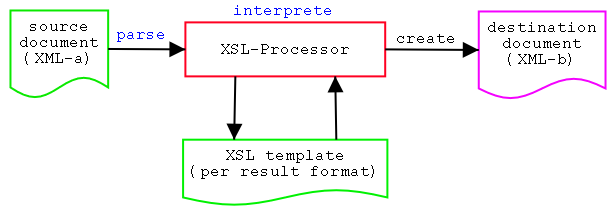
Pic 3a: creation process
1. reading and parsing an input document, 2. reading and parsing an XSL stylesheet, 3. applying rules (interpretation) and finally 4. creating a result tree (output document).
3.2 practical examples > top of page
3.2.1 NevepriseDoc XML > top of page
We will not go into further technical details so far, but i want to show a very practical example for the "inside out" method.
What you are reading right now is the result of an XSL transformation (or XSL Transformation - XSLT). I have written this article in a custom XML format called NevepriseDoc XML. This is a format that i have developed myself over some months to perfectly fit my personal needs for this and other websites.
Why not HTML directly? There is one special reason: by writing in my XML format, i can create several output formats by using one source only, for example:
- plain text
- HTML w/ JavaScript
- plain HTML
- Postscript
- ...
You still might say: okay, that still works when writing in HTML; conversions to the named formats can still be achieved by it.
But there is one very important thing: HTML is a pure page description language. This means that i cannot describe internal parts a semantical way; in HTML i can say: make this text red and bold while in XML i can give a text a special meaning, e.g. this is a hint, this is a warning, this is a copyright note, this is an article's index, this is the description of an image and this is a list of definitions. In HTML i only can make these items by visual differences.
But by using XML, i can also extract parts of the document, e.g. i just want to have all occurring source codes, just the definition lists or just the index. This is not possible in HTML except by manual editing.
With NevepriseDoc XML, i write my articles once and can control the way this data is used. And without having redundant writings, i can easily create any output format. I just have to develop a XSL stylesheet once per format that are used to create the resulting documents.
If over the time i want to do global design modifications, i just have to edit one single stylesheet and after automated recreation of the target documents, all of them carry the modification. This is very similar to Cascading Stylesheets (CSS) in HTML but with much more control.
3.2.2 Content Management System > top of page
This would be the ideal way: an enterprise stores its important documents in a native XML format. Whenever you need a document, you can convert it to the desired format:
One needs it as a Word document, it can be converted into. One needs a web page for the internet www site, it can be converted. One needs a white paper, it can be converted.
And all that can be done by using one special resource - no redundant storage has to be done.
The main thing is that you just not convert the document types but also gain much more control on the transformation and reserve semantic information in the XML source, while most target documents just contain layout information.
Copyleft (C)2002 by Timo "Blazko" Boewing. This document is licensed under the terms of the GPL.