
Review: XMMS
X Multimedia System audio player
The X Multimedia System is a very common but also powerful and flexible audio player for GNU systems.
1.0 about XMMS > top of page
The X Multimedia System by 4Front Technologies (they also developed the Open Sound System, OSS) is a classic audio player under GNU systems, besides players like mpeg123 or Noatun from the KDE project.
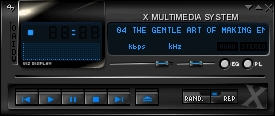
Pic 1.0a: XMMS normal view, def. skin
Especially ex-users of the Windows platform tend to use the XMMS (if they are not using the KDE player) cos they can reuse their WinAmp skins and the application is equally to use.
2.0 review > top of page
XMMS is a highly modificable allround audio player that can handle almost formats. If they are not supported by default, these capabilities can easily be expanded by using plugins. No matter if newbie or professional, XMMS is easy to handle and offers all kinds functionality.
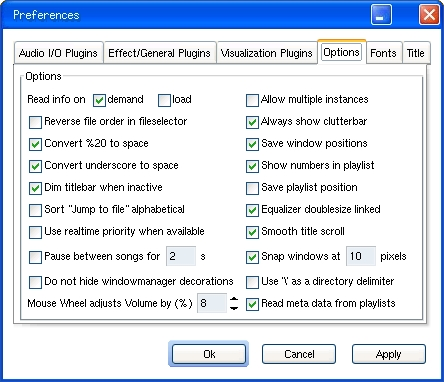
Pic 2.0a: the options dialog; and hey: no boohs for the XP theme :-) (click to enlarge)
As a full grown player needs, XMMS can also work with playlists. These lists are containers containing links to files, so you can bundle all files of an album in that file to open it directly, but you can also create your favourite collections from all over your local and remote files (e.g. NFS mounted ones). You know that is different from making favourite collections by using tapes.
2.1 skins > top of page
It has become tradition that media players seldom look like ordinary GTK apps, no most of them out there have become themeable, i.e. you can apply a new look to them with special files containing new pixmaps; including new buttons, sliders, fonts and that. One of the most prominent skinable players are Nullsoft's WinAmp, Microsoft's Media Player (as of version 7 and above), KDE's Noatun and many more.
4Front's XMMS is no exception. You have different opportunities and sources to change the visual of your XMMS. You can get skins from the www from XMMS' home or just use WinAmp skins, cos XMMS can read them and vice versa. Themes.org is also a good place to visit, not only for XMMS skins.
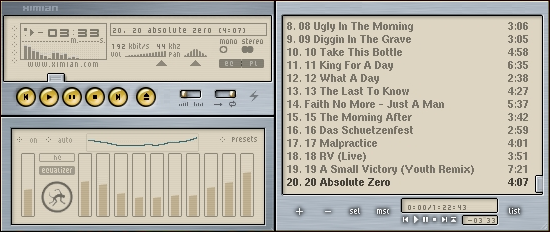
Pic 2.1a: XMMS full view, Ximian skin (click to enlarge)
Of course you can create your own skins. This should not be very difficult: just take any existing skin file, unzip it, and replace the grafix inside it with your versions and zip it again. The .wsz files from WinAmp are just renamed zip files.
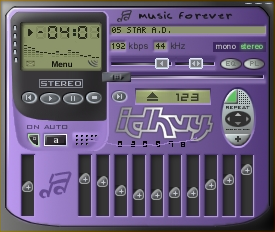
Pic 2.1b: XMMS full view, idhuy skin
The only limitations are your fantasy and maybe realisation problems with your favourite painter app, but besides you see it is not that hard to do your own themes.
2.2 I/O plugins > top of page
XMMS is not limited to just play ordinary PCM waves or MP3, it supports a nice bunch of input formats by use of input plugins. Following a list of common plugins, but you can always retrieve new plugins right from XMMS' website. Examples of supported data formats:
- Audio CD (directly from your CD-ROM)
- PCM wave files
- Ogg/Vorbis
- MPEG 1 Layer 3 (MP3)
- MikMods (perhaps .mod files from AMIGA???)
- bare oszillo stuff (tone generator)
- CIN (.cin from id software, Quake music?)
- Audio/Video Interleaved (AVIs, so it becomes real media player)
- MIDI
- Radio FM (so it becomes a tuner)
- RealAudio
- SID (C64)
- SMPEG (see AVI)
- Quicktime (not all kinds)
As you see, XMMS can be expanded to nearly read from any source and understand the formats. Finally, it is not only limited to audio formats, but extended media player formats (video) are not within the standard version so far.
But XMMS also has to purge its data to anything. That is the task of an output plugin. Normally you will use a plugin for your favourite sound demon or device, e.g.:
- Open Sound System (OSS)
- Enlightened Sound Daemon (esd / eSound)
- KDE Analog Realtime Synthesizer (aRts)
These plugins are required to hear what you want to hear - thru your sound card. But there are other plugins that can other things with the output or are just for other sound daemons:
- Advanced Linux Audio Architecture (ALSA)
- Irix (for SGI's workstations)
- Compaq True64
- DBMix (deejaying software)
- Solaris
- Crossfader interface
- GKrellM support (the favourite GNOME tricorder)
- diskwriter (redirects the analog outstream to a file on the HDD)
Just have a look on the website, there are numerous plugins for different purposes. For example there are ones for controling "disco stu" flashlights via parallel ports or just GUI extensions like enhanced playlist editors and that. Other useful plugins exists for controlling your XMMS via remote control or a joystick (!).
2.3 sound fx plugins > top of page
XMMS comes with a 10 band graphical equalizer to adjust the tone characteristics. Additionally, you can use plugins for extended sound control like digital sound processors (DSP), e.g.:
- extended stereo
- echo
- QSound
- time stretch
- speaker emulation (for headphones)
- volume normalizer
- karaoke / voice removal
- misc. DSPs
2.4 visual plugins > top of page
Amusement for the ears, but what with the eyes? Of course there are plugins for miscellaneous visual effects. When you have once used WinAMP, you will already know them (or from any other player). The following screenshots speak for themselves.

Pic 2.4a: a blur scope
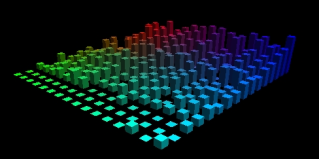
Pic 2.4b: an OpenGL scope

Pic 2.4c: examples for the gdancer plugin
3.0 rating > top of page
- XMMS
- Category:
- software, audio
- Function:
- audio player
- Version:
- 1.2.6
- By:
- 4Front Technologies
- License:
- GPL (app) / BSD (libs)
- Platforms:
- GNU platforms, e.g. GNU/Linux
- BSD platforms
- Solaris
- Windows 32
- Features:
- plays almost all file formats
- extensible through plugins for input, output, effects and visualization
- themeable with use of skins
- built-in equalizer
- playlist support (m3u)
- AMD 3DNow! and MMX support
- Pro:
- good sound quality, even with activated EQ
- can play Ogg/Vorbis and other (yet) uncommon formats
- built-in equalizer and presets
- playlist support
- can be extended with plugins: i/o plugins, fx plugins, visualization plugins (e.g. OpenGL sound analyzer)
- skin support, WinAmp skins also work
- highly configurable
- Contra:
- any?
- Rating:
- 10 / 10
- Comment:
- nice and simple to use audio player
Copyleft (C)2002 by Timo "Blazko" Boewing. This document is licensed under the terms of the GPL.