
Review: OggEnc
Ogg/Vorbis encoder
What LAME is to the MP3 creator is oggenc to the Ogg/Vorbis user: it converts uncompressed audio files, e.g. PCM wave files, to Ogg/Vorbis compressed audio files.
1.0 about > top of page
1.1 about Ogg/Vorbis > top of page
Normally, people use the MP3 format on their computers and portables. The benefits are obvious: The MPEG Layer-3 compression allows filesizes of approx. one tenth of uncompressed raw audio data, strongly depending on desired quality and number of sound channels. This enables users to have all of their CDs quickly at hand on their computers with quite good sound quality.
This gave MP3 very huge success, not at least due to the reason that these small file sizes allowed music exchange (most of it illegal) over the internet, even when using a standard modem.
But there is a problem: MP3 is a development of the MPEG group, one of its most prominent member and main developer is the Fraunhofer Gesellschaft. But MPEG is not open. If you are just listening to MP3, there is no problem, but if you want to create / convert your own MP3 files or want to develop a MP3-writing library or application, you have to pay license fees to the MPEG group -- it is patented.
Ogg/Vorbis however, is an open standard whose development started around 1993, more or less for fun; but it evolved to a full alternative with same quality and feature considerings. Here a small feature list of Ogg/Vorbis:
| specification / feature | value |
|---|---|
| sample rates | 44.1 to 48 kHz @ 16 bits and up |
| support f. variable bitrates | yes |
| bitrates | 16 to 128 kbps / channel |
| max. channels | 255 |
| streaming support | yes |
| license | BSD (libs), GPL (all other); royalty-free, patent-free |
1.2 about OggEnc > top of page
OggEnc is a Ogg/Vorbis encoder that reads uncompressed audio files and converts them to .ogg files ready for use in your favourite audio player.
Although the underlying vorbis library is considered beta (release candidate 3 at the time of this writing) it is very usable, the quality is really perfect.
2.0 review > top of page
OggEnc comes as a console application with a nice set of parameters. But the internal help (oggenc --help) is well structured and parameters well documented. The amount of params meet realistic purpose, there is no overhead of unimportant settings.
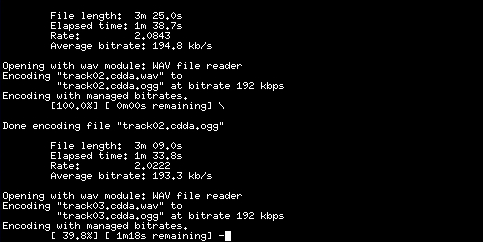
Pic 2.0a: OggEnc in action (click image to enlarge)
Thus, the following simple command line is enough for converting all PCM wave files in a directory to Ogg files, using a variable bitrate around 192 kbps @ 16 bit:
oggenc --bitrate 192 *.wav
When started, OggEnc prints out information on current status and file properties, including:
- elapsed and remaining conversion time plus percentage done
- final audio stream runtime length (m, s)
- average bitrate
- current i/o filenames
Left to say that OggEnc is a tiny and very useful tool. It shows no instabilities and is easy to use, performance can be compaired to MP3 converters. The output quality is excellent. To avoid jitter on high frequncies (e.g. a drum's hi-hat) i recommend using a variable bitrate around 192 kbps, but less will also do good quality.
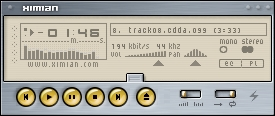
Pic 2.0b: Oggs play out-of-the-box in nowaday players
When having created .ogg files, you may ask if your audio player can use this format. If you have quite recent software, most of the players will come with Ogg support by using appropriate plugins and libvorbis.
Examples of players with Ogg/Vorbis support:
- XMMS, see picture 2.0b (Open Sound System and other targets, e.g. esd)
- Noatun (standard KDE media player, aRTs)
- WinAmp (Win32 platform)
If your player does not support Ogg/Vorbis, please have a look at the developer's website, they will surely have plugins for the player. If not, try to search on the www for third party plugins.
3.0 rating > top of page
- OggEnc
- Category:
- software, audio
- Function:
- wave to .ogg converter / Ogg encoder
- Version:
- 0.9 (encoder), RC3 (libvorbis)
- By:
- Xiph
- License:
- GPL (app) / BSD (libs)
- Platforms:
- GNU platforms, e.g. GNU/Linux
- BSD platforms
- Solaris
- Windows 32
- Features:
- dest. file formats: wave, raw PCM (headerless waves), aiff, aiff-c
- creates oggs w/ fixed or variable bitrates
- Pro:
- intelligent variable bitrate setting
- good performance
- easy handling
- due to standard, first quality sound files
- files can be equipped with meta information (kinda ID3 tags), e.g. interprete, date of performance etc.
- Contra:
- any?
- Rating:
- 10 / 10
- Comment:
- nice and simple to use converter
Copyleft (C)2002 by Timo "Blazko" Boewing. This document is licensed under the terms of the GPL.